

Apple made a big announcement for the iPhone Duo. It’s the first foldable phone from Apple, and it doesn’t come out until October 23, so most of the world has never actually held one. As someone who built an app with Claude on nights and weekends, I had no idea if (or how) to adapt Saalo for the iPhone Duo. I got an email from Apple inviting all developers to start building for iPhone Duo, and at first I didn’t have the bandwidth to even think about it. But then I started to wonder what Claude could do with this.
I spent a weekend on it with Claude, and I’m proud to say that I now have a app ready for Duo! If you have an app and you’re thinking about the Duo, here’s the path I took, where I got to, and how Claude helped me get there.
Turning documentation into ideation
Let’s start with something: Saalo is about less screentime. So developing for a device with twice the screens seems bizarre. Personally, I don’t want a Duo. It feels invasive to put another screen in front of me. And this got me wondering if Saalo might have an even more improtant role in world of dual-screen devices?!
Given that I’m not the target audience for Duo, I had to learn a bit about it. First, I asked Claude to read everything Apple has published about the Duo: the developer docs, Apple’s design video for the Duo, and a few posts from developers who’ve been digging in. I wanted to know what’s actually possible before getting excited about ideas. Know your enemy, I guess.
Claude came back with a simple list, with links. A few things you can do:
Widgets and Live Activities (the live cards on your lock screen) show up on the small outside screen when the phone is closed.
If you stand the phone up like a tent, StandBy mode turns on, even without a charger.
When your app is open, it can tell how far to a degree the phone is folded, and whether it’s closed, partly open or all the way open.
On the big inside screen, you can show two things side by side.
And there are a lot of things developers can’t do on Duo, but that’s a post for another time.
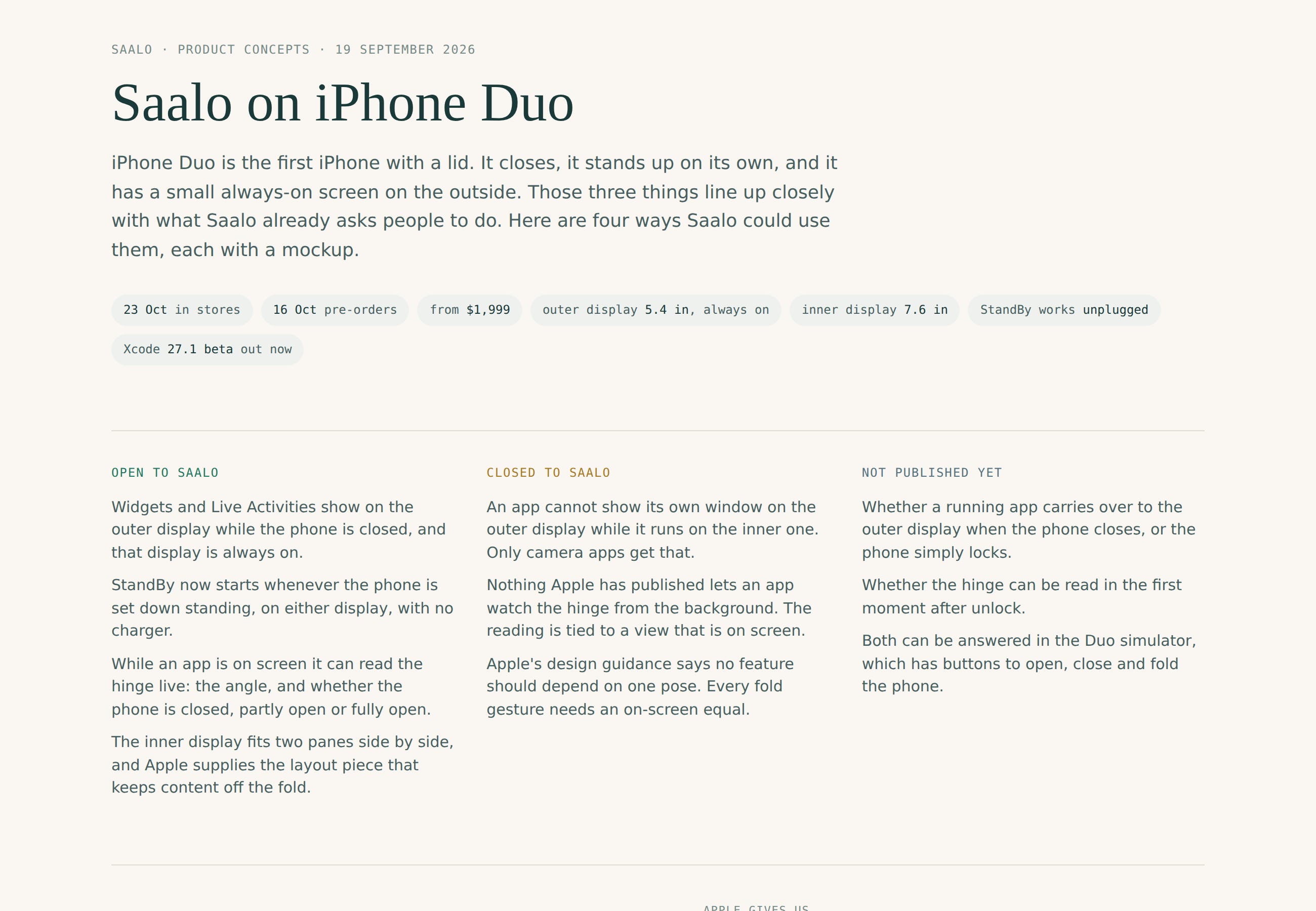
Claude’s list of what the Duo allows, what it doesn’t, and what Apple hasn’t said yet.
Then I asked for ideas for Saalo, and Claude came back with four. It even made each one into a clickable prototype where I could fold a fake Duo with a slider and watch Saalo react. My favorite is “close to begin.” You’re looking at Saalo and fold the phone shut, and your saalo session starts. When you open it back up, it ends. For an app about putting your phone down, I thought that was pretty cool.
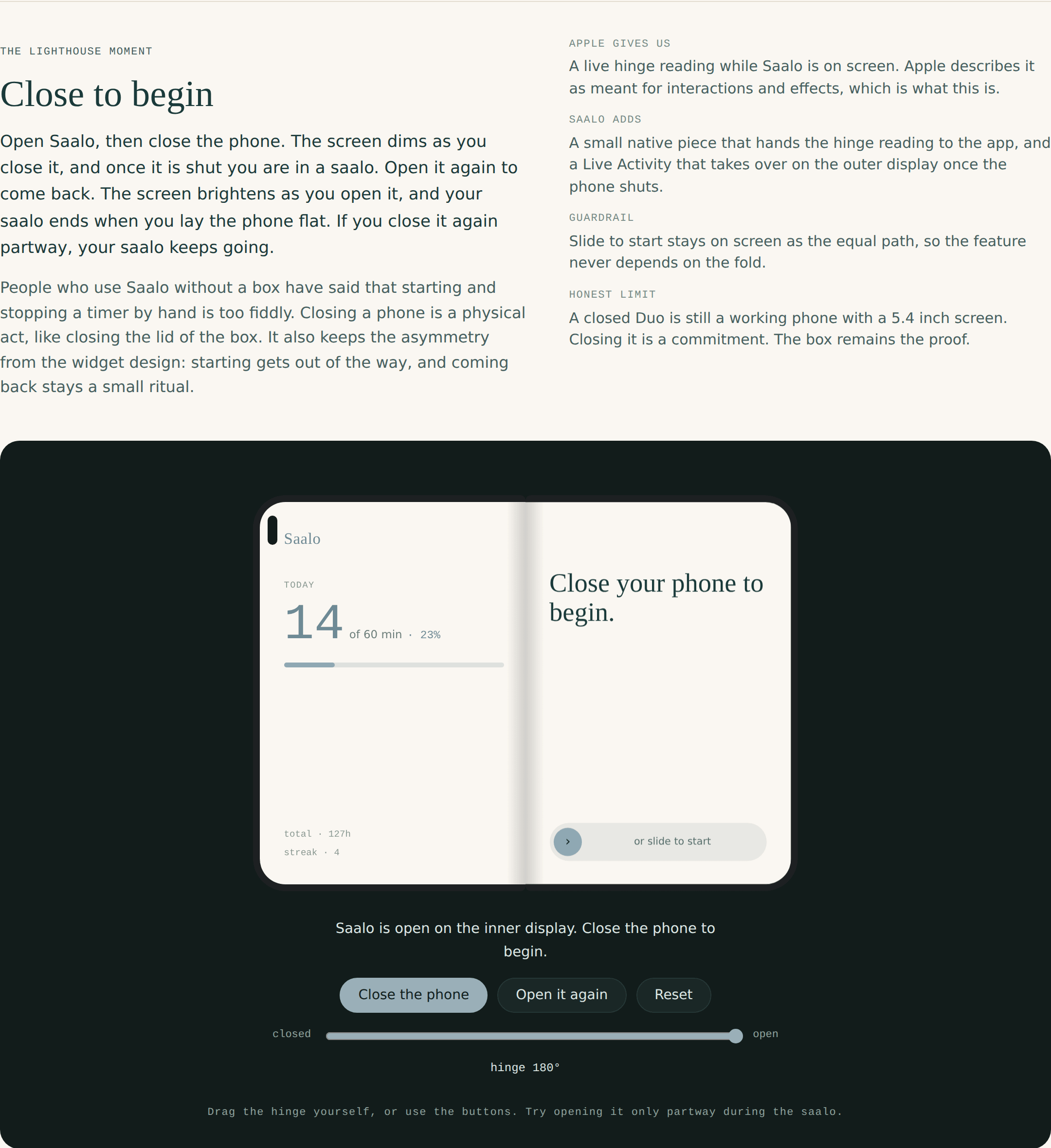
One of the clickable prototypes. You could drag the hinge and watch Saalo react.
We did the big inside screen the same way. Claude would draw a layout, I’d tell it what felt off (”sliding from bottom left to far bottom right is not a natural movement”), and it would redraw it. A few rounds later we had two Saalo panes side by side, with the buttons down by your right thumb. Sidenote, I’m genuinely curious how developers are going to handle this double-wide view - will they go two panes, or create unique experiences on each side. Post your thoughts in the comments. I went with a simple approach for now.
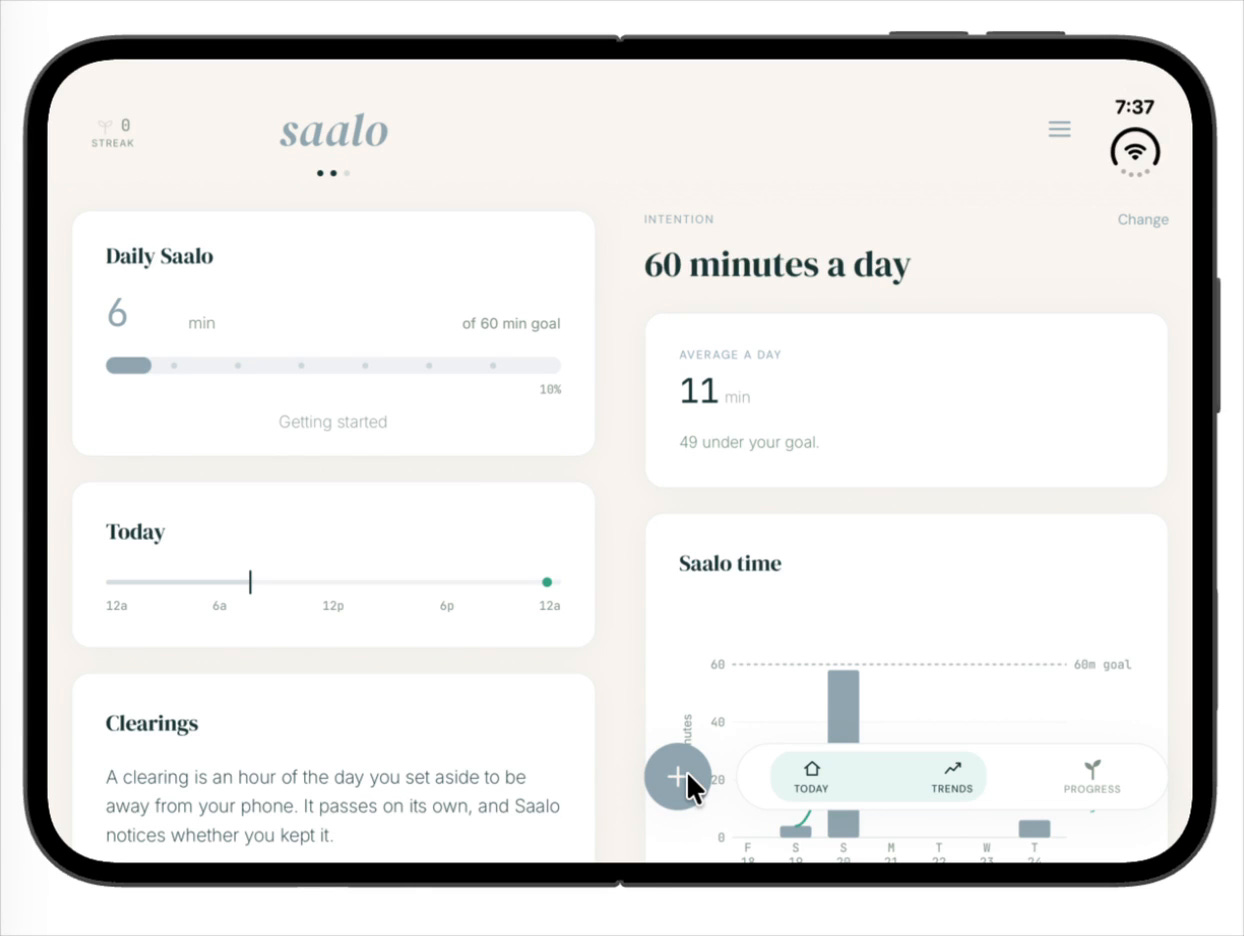
Two Saalo pages side by side on the inside screen.
How Claude helped with the simulator. Or was it Device Hub 27.1?
Since you can’t buy a Duo yet, you test on a simulated one on your Mac. This part was a mess, and I almost gave up here. tldr - Reddit saved the day. A few things that tripped us up, in case it helps:
In Xcode 27, the old Simulator app is gone, and it’s now called Device Hub. Some tools still look for the old one, so Claude patched ours.
The Device Hub that comes with Xcode 27.0 can’t open or fold the Duo. We looked everywhere. Claude even looked at my screen and clicked through the menus itself. I finally found the answer on Reddit: the fold buttons are only in the Xcode 27.1 beta. Claude then checked my Mac and found I had both versions installed… and had been using the wrong one all night.
Your app also has to be built with 27.1 to know the phone is folding at all.
If your app starts up the older way, anything you build with the new Xcode will crash as soon as it opens on iOS 27. I have NO CLUE what a “scene life cycle” is, but Claude fixed it.
You can’t submit to the App Store from a beta Xcode, so keep the regular one around too.
Once all that was sorted, I closed the fake phone and a saalo started. So cool! Here’s a video:
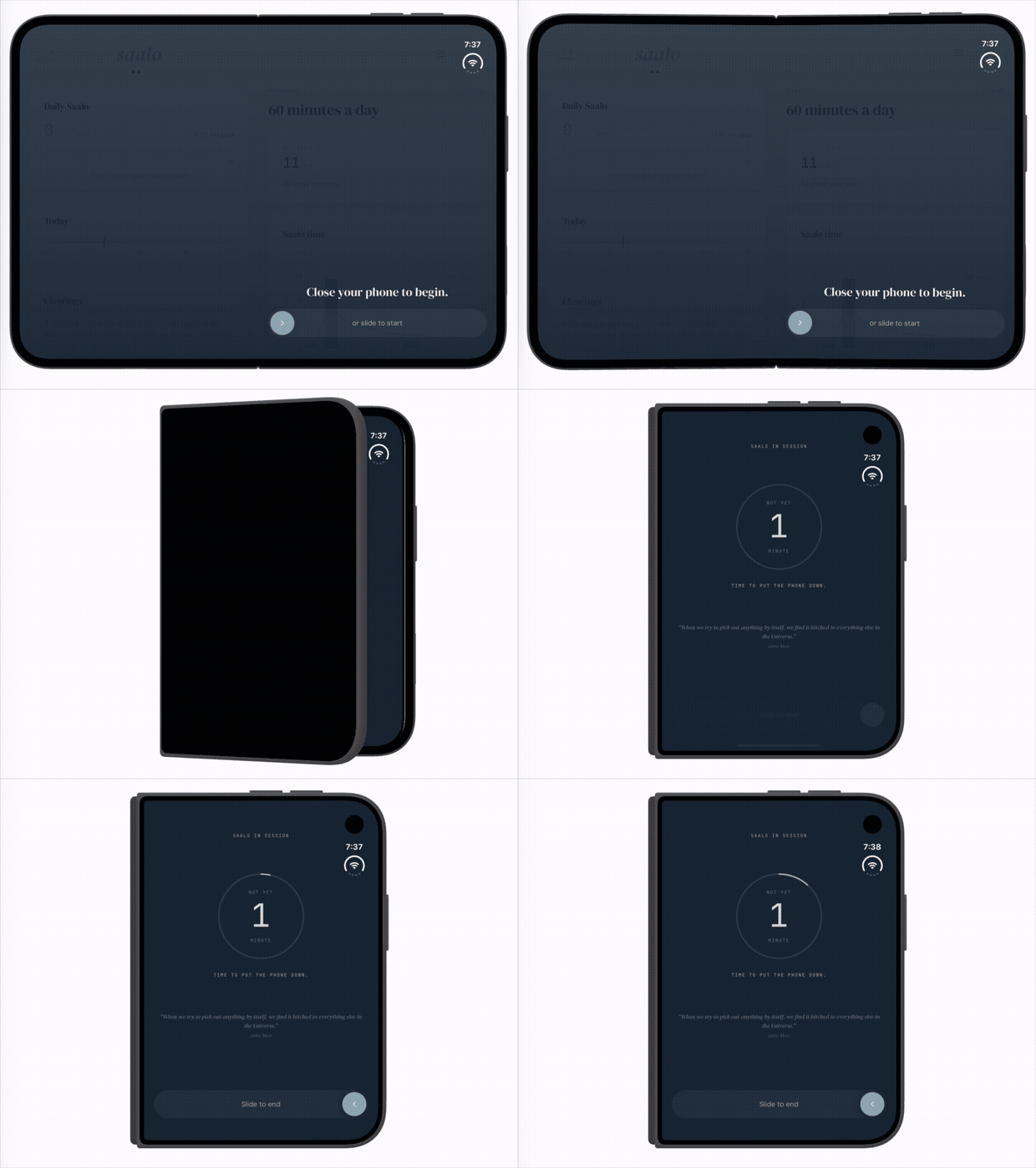
Close to begin in the Device Hub simulator.
How Claude helped with testing
Then it was build, screenshot, fix, over and over, about a dozen times on a Sunday morning. I’d send Claude a screenshot or a screen recording with a note like “weird blinking when the saalo starts.” It would go through the video frame by frame and find the exact moment something flashed. Kind of amazing.
Small tip: if the outside screen shows up upside down in Device Hub, that’s just the simulator. Rotate the phone before you close it.
Making a video to submit to Apple
Apple lets you nominate your app to be featured, and for Duo you want a short video that shows off why it makes sense on a foldable. Claude wrote the nomination. Device Hub’s own recorder only captured the inside screen (the outside one just went black), so I used the Mac’s regular screen recording on the Device Hub window instead. Claude cut it down to 26 seconds showing the phone closing, the saalo running on the outside screen, and the phone opening back up. It’s submitted, and Apple will only gets back to me if they pick you, so… fingers crossed!
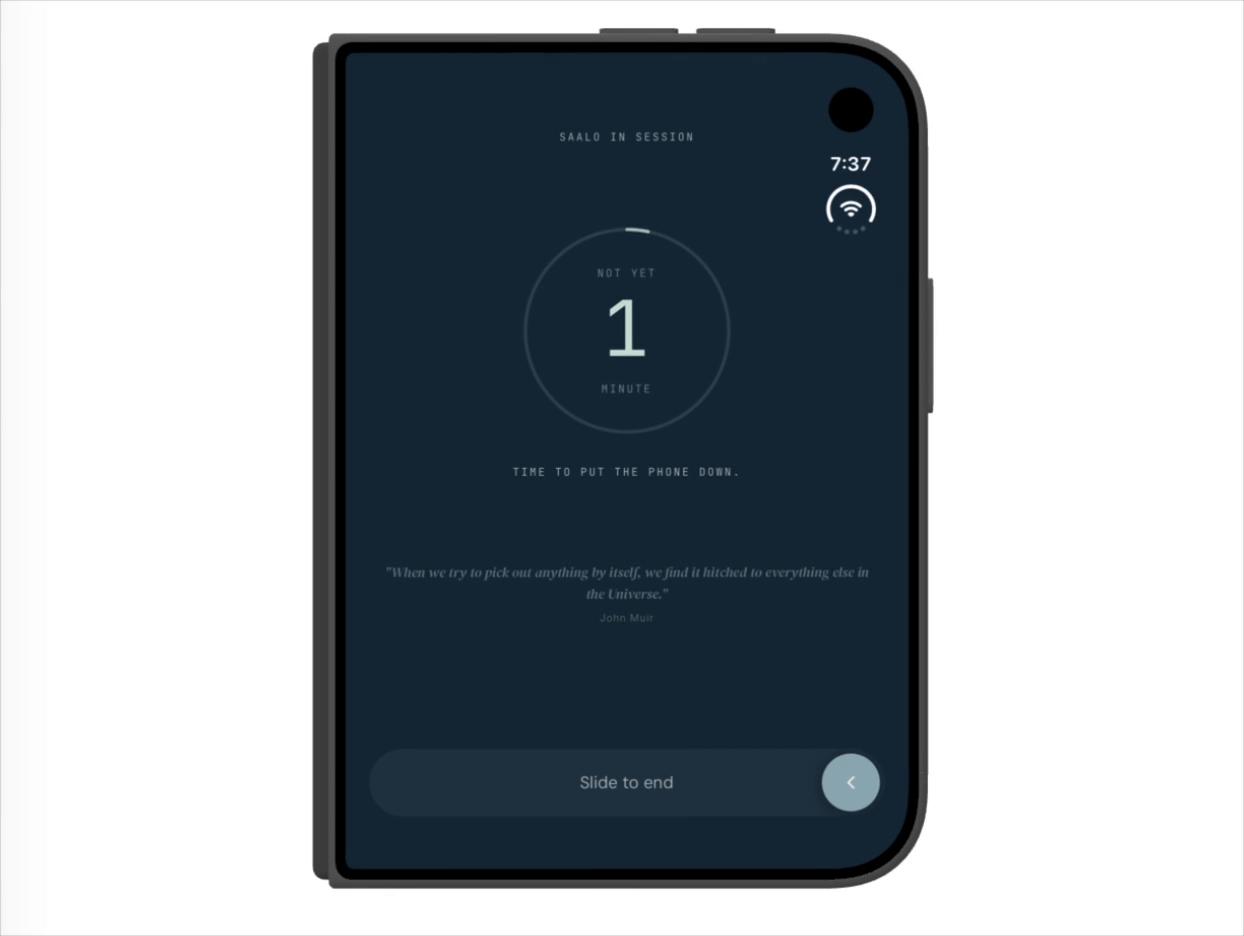
Saalo running on the outside screen while the phone is closed.
Where Claude stumbed
None of this was clean - as is the case with most of my adventures with Claude. Claude guessed which simulator button did what, and got it wrong. One of its fixes turned the whole screen navy. Another screwed up the margins when the phone was rotated. And I’m the one who found the Reddit answer, not Claude. As usual, trust but verify.
If you want to try this yourself
Here’s a prompt you can paste in to get started.
I want to adapt my app for the iPhone Duo, Apple’s foldable, and I’d like your help.
Before anything else, ask me a few questions, one at a time: what my app does, who it’s for, what I hope it could do on a folding phone, etc..
Then read only Apple’s own sources (the iPhone Duo developer docs and design talk) plus well-known developer write-ups. Give me a short list of what an app can do on the Duo, what it can’t, identify any blindspots. Cover the outside screen, StandBy and the tent pose, the hinge, and the inside screen.
Next, give me three or four ideas for my app and make them into clickable prototypes before any code gets written.
When we start testing, walk me through the Duo simulator, including which version of Xcode I need for the fold controls.
If you give this a try, I’d love to hear how it goes, or what’s worked better for you. And if these posts are useful, subscribing would mean a lot. I’ll keep sharing as I go (hopefully on a real Duo soon!). Like I said, I’m super interested what design paradigms will emerge for apps within the double-wide portrait mode.
My latest version of Saalo is Duo-ready, even though the Duo won’t launch until late October. And for all of us still on “regular” iPhones, it should still work great. There are some new additions too, like live activities on your lock screen while a saalo runs. Check it out on the App Store, and I’d love any feedback.